Blog Detail
How to Read RFID Tags: A Practical Guide for Beginners
 " alt="blogDetail">
RFID technology appears in more places than most people realize. A warehouse worker scans a pallet without opening a box. A retailer tracks products on shelves. A farm identifies animals using RFID ear tags. A laundry service tracks hundreds of uniforms.
But how does the system actually read an RFID tag? The process is simpler than it sounds: an RFID reader sends a radio signal, the tag responds with its stored information, and the reader passes that information to software for processing. This guide explains how RFID tag reading works, what equipment you need, and how businesses use it in real-world situations.
What Is an RFID Tag?
An RFID tag is a small device that stores information and communicates wirelessly with an RFID reader.
Most RFID tags contain:
A chip – stores the tag’s identification data.
An antenna – receives and sends radio signals.a
A substrate or casing – protects the chip and antenna.
A unique identifier – allows the system to distinguish one tag from another.
RFID tags come in different forms depending on the application.
| RFID Tag Type | Common Application | How It Is Used |
| RFID labels | Inventory and retail | Attached to products or packages |
| RFID cards | Access control | Used for identification or entry |
| RFID wristbands | Events and healthcare | Worn by people |
| RFID ear tags | Livestock tracking | Attached to animal ears |
| RFID laundry tags | Textile management | Sewn or attached to garments |
| RFID hard tags | Industrial tracking | Used on equipment, pallets, and assets |
How Does an RFID Reader Read a Tag?
An RFID reader does not simply “look” at a tag like a barcode scanner. It uses radio communication.
The basic process follows these steps:
1. The reader sends a radio signal.
2. The RFID tag detects the signal.
3. The tag responds using its antenna.
4. The reader receives the tag’s information.
5. The system identifies the tag.
6. Software records or uses the information.
For example, imagine a warehouse employee moving a box through an RFID reader’s scanning area. The reader can detect the tag attached to the box and send its ID to the inventory system. The employee does not need to remove the box or manually enter its details.
RFID Reading Process at a Glance
RFID Reader → Radio Signal → RFID Tag → Tag Response → Reader → Software/Database
This wireless communication makes RFID particularly useful when a business needs to identify many items quickly.
What Do You Need to Read an RFID Tag?
You normally need three main components:
RFID Tag: The tag carries the information that the system needs to identify an item, animal, asset, or person.
RFID Reader: The reader communicates with the tag and captures its data. Readers can include:
1. Handheld RFID readers
2. Fixed RFID readers
3. Integrated reader modules
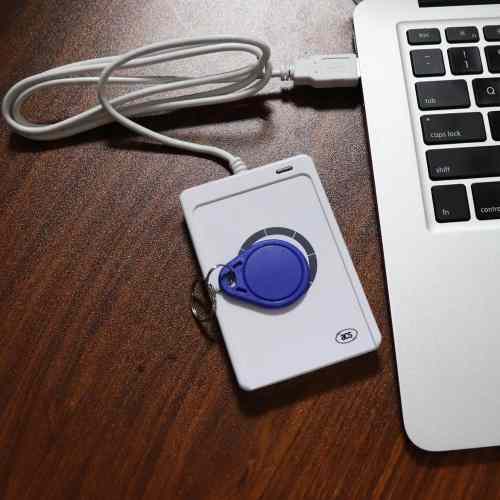
4. Desktop readers
5. RFID-enabled portals
RFID Antenna: The antenna sends and receives the radio signal.
Some readers have integrated antennas, while other systems use separate antennas to create a larger reading area. You may also need RFID software or middleware to transfer the captured information into an inventory, warehouse, access-control, or tracking system.
How to Read an RFID Tag Step by Step
Step 1: Choose the Correct RFID Technology
First, identify the type of RFID tag you want to read. Common RFID frequency ranges include:
LF (Low Frequency) – often used for animal identification and access applications.
HF (High Frequency) – commonly used for cards, tickets, and short-range identification.
UHF (Ultra-High Frequency) – widely used for inventory, logistics, retail, and asset tracking.
The reader must support the tag’s frequency and communication protocol.
Step 2: Connect the RFID Reader
Connect the reader to the appropriate power source and, depending on the model, to a computer, mobile device, network, or control system. Some modern handheld readers communicate with smartphones or tablets.
Step 3: Install or Open the Reading Software
The software receives information from the RFID reader. Depending on the application, it may display:
1. Tag ID
2. EPC number
3. Read time
4. Reader location
5. Product information
6. Inventory status
Step 4: Bring the Tag Within Reading Range
Position the RFID tag within the reader’s effective range. The exact distance depends on factors such as:
1. RFID frequency
2. Reader power
3. Antenna design
4. Tag design
5. Orientation
6. Surrounding materials
7. Environmental conditions
Step 5: Let the Reader Capture the Tag
Once the reader detects the tag, it communicates with it and retrieves the available data. With UHF RFID, one reader can often identify multiple tags within its reading zone.
Step 6: Check the Captured Information
The software should display the tag’s identifier or associated information. For example:
Tag ID: 3008 33B2 DDD4 0012
Product: Warehouse Box #1248
Status: Received
The actual data format depends on the RFID system and application.
Real-Life Example: RFID in a Warehouse
Imagine a clothing distributor receives 500 jackets from a supplier. Each jacket has an RFID tag. Without RFID, employees may need to scan individual barcodes or manually count the boxes. With an RFID system, the process can look like this:
1. Workers place the incoming cartons near an RFID reading zone.
2. The reader detects the RFID tags.
3. The system captures the tag IDs.
4. The inventory software matches those IDs with product records.
5. The system updates the received inventory.
6. Workers can move the products to storage.
Instead of asking an employee to identify every item manually, the RFID system automates much of the identification process.
The important point: RFID does not automatically know that a tag represents a “blue jacket, size M.” The database or software needs to associate the tag’s identifier with that product information.
Case Study: RFID for Livestock Identification
Consider a cattle farm managing a large herd. Each animal receives an RFID ear tag containing a unique identification number. When a farmer needs to identify an animal, they can use a compatible RFID reader. The process might look like this:
RFID Ear Tag → Handheld Reader → Animal ID → Farm Management Software
The farmer can then associate the ID with information such as:
1. Animal records
2. Vaccination history
3. Breeding information
4. Weight records
5. Movement history
6. Health-related records
Why This Matters
Suppose a farmer needs to identify one animal among 200 cattle. Reading the RFID ear tag can provide the animal’s unique ID without requiring the farmer to visually read a printed number from a distance. This example shows why RFID works particularly well when businesses need fast, reliable identification of individual items or animals.
Can a Phone Read an RFID Tag?
However, not every smartphone can read every RFID tag. Phones commonly support NFC, which is based on HF RFID technology. This means a compatible smartphone can read certain NFC tags. For example, a phone may read an NFC tag embedded in:
1. Smart cards
2. Product packaging
3. Promotional materials
5. Access systems
6. Digital business cards
However, a typical smartphone cannot simply read every UHF RFID inventory tag. If you want to read UHF RFID tags, you generally need a compatible UHF RFID reader or an RFID reader accessory designed for mobile devices.
Also Read: In–depth Analysis of NFC Technology in Embedded System Development
Why Can’t an RFID Reader Read Every Tag?
Several factors can affect RFID reading performance.
| Factor | Possible Effect |
| Frequency | Reader and tag must use compatible technology |
| Tag orientation | Some tags perform better when positioned correctly |
| Metal | Can interfere with some RFID tag designs |
| Liquid | Can affect certain RFID frequencies and tag performance |
| Distance | Tags outside the effective range may not respond |
| Reader power | Higher or lower power can affect reading range |
| Antenna position | Poor positioning can create weak reading zones |
| Tag design | Different tags perform differently in different environments |
This is why selecting an RFID tag based only on its size or price can create problems later.
RFID vs Barcode: How Are They Different?
Both technologies identify products, but they work differently.
| Feature | RFID | Barcode |
| Requires line of sight | Usually no | Usually yes |
| Can read multiple items | Yes, depending on system | Usually one at a time |
| Uses radio communication | Yes | No |
| Can store electronic identification data | Yes | Barcode represents encoded information |
| Can work through some materials | Yes, depending on tag/application | No |
| Reading distance | Varies by technology | Usually short |
| Typical cost | Higher | Lower |
For a small shop with a few products, barcodes may work perfectly well. For a large warehouse that needs to identify many items quickly, RFID can offer a different approach to inventory tracking.
Common Problems When Reading RFID Tags
If your reader does not detect a tag, check these areas first:
Check Compatibility: Make sure the reader supports the tag’s frequency and protocol.
Check the Reading Distance: Move the tag closer to the antenna and test again.
Change the Tag Position: Try rotating or repositioning the tag.
Check the Material: Metal and liquids can affect RFID performance, depending on the system.
Check Reader Settings: Review reader power, antenna settings, frequency configuration, and supported protocols.
Test Another Tag: If another tag works, the problem may relate to the original tag rather than the reader.
A Simple Example to Understand RFID
Think of an RFID system like a conversation.
The reader asks:
“Which tags are nearby?”
The RFID tag responds:
“I am Tag 12345.”
The software then says:
“Tag 12345 belongs to Product A.”
This simple exchange allows businesses to connect a physical object with digital information.
Where Is RFID Tag Reading Used?
RFID readers can support many applications, including:
1. Retail: Product and inventory tracking
2. Warehousing: Receiving and shipment verification
3. Logistics: Package and pallet identification
4. Healthcare: Equipment and asset tracking
5. Agriculture: Livestock identification
6. Laundry: Garment and textile tracking
7. Manufacturing: Work-in-progress tracking
8. Events: Ticketing and attendee identification
9. Libraries: Book identification and inventory
10. Access control: Identification and entry management
The specific tag, reader, antenna, and software configuration should match the environment and use case.
Final Thoughts
Reading an RFID tag involves more than simply placing a tag near a reader. The tag, reader, antenna, frequency, environment, and software all need to work together.
For a basic setup, the process is straightforward:
Choose a compatible RFID tag → connect the right reader → position the tag within range → capture the tag ID → connect that ID to your software or database.
Once businesses understand this process, they can use RFID to automate identification and reduce the amount of manual data entry involved in everyday operations The best RFID setup depends on what you need to track, how far away you need to read the tags, how many tags you need to read at once, and the environment where you will use them.