Blog Detail
How to Read RFID Tags: A Practical Guide for Beginners
 " alt="blogDetail">
Determine where the tag will be used and what it will be attached to. A tag meant for attaching to a cardboard box might not work well when attached directly to metal. A tag that does well in an indoor, clean setting might also need a new design when used outdoors or in an industrial setting. Before ordering your tags, consider:
1. Frequency of RFID
2. Required read distance
3. Size of the tag
4. Material to which the tag will be attached
5. Conditions of the environment
6. Memory needs
7. Requirements to read/write
Choose a Compatible RFID Reader
Finally, decide on the reader. The reader needs to suit the desired RFID tag. Consider the following:
1. Do you need to check the contents of a warehouse?
You could choose a portable UHF RFID reader.
2. Want to track products when passing through a doorway?
You might choose a fixed reader.
3. Are you going to test RFID tags one by one?
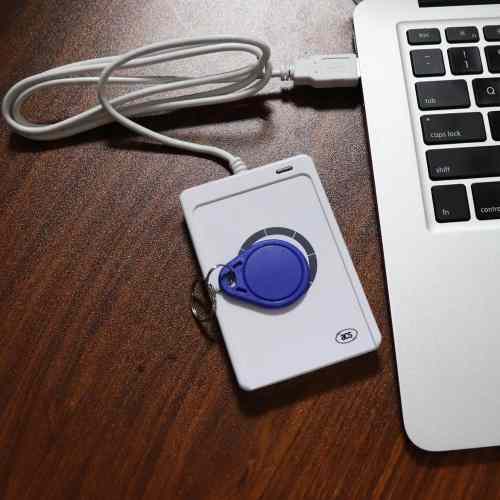
You would probably just need a desktop reader.
Connect the Antenna: The antenna is an essential component of the system. The antenna will help transmit the signal from the reader to the RFID tag and capture the signal from the tag. There are readers that allow multiple antennas to be used. This might help increase your coverage area, but adding antennas alone does not necessarily fix all your coverage issues. Antenna placement is crucial. For instance, a warehouse reader might perform well when placing the antenna near a door entrance but fail to read the tag when mounted improperly.
Connect the Reader to Software: There has to be someplace for all the data collected by the reader to go. Depending on your reader, you may connect it via:
1. USB
2. Bluetooth
3. Wi-Fi
4. Ethernet
5. Serial communication
The software then takes all the data collected from the tags and makes it usable.
Start Reading: After all connections have been made, switch on the reader and introduce a compatible RFID tag within its reading range. The reader emits a radio wave. This tag reads the wave and makes a response to it.
This response is captured by the reader and transmitted to the software program. In most of the UHF RFID systems, the reader captures an Electronic Product Code. The EPC serves as an identifier for your software to search for the data about the product in your database. Here is how:
| Tag | EPC | Product |
| Tag 1 | 3008…A12 | Laptop |
| Tag 2 | 3008…A13 | Monitor |
| Tag 3 | 3008…A14 | Keyboard |
The tag doesn’t need to carry all of the information about the product. In most systems, the tag only serves as an identifier, whereas all of the rest of the information is stored in the database.
Also Read: How to Read RFID Tags: A Practical Guide for Beginners
How to Read RFID Tags With a Handheld Reader
Take the example of managing inventory at a warehouse. The company manages thousands of products, and every product has its own RFID tag. One of the employees has to do a stock check. Now, instead of going around and scanning all the barcodes, he picks up the RFID reader and walks around the warehouse. This is how it works:
1. He switches on the RFID reader.
2. The reader connects to the inventory management application.
3. He starts walking along the rows of racks.
4. The reader emits radio waves.
5. The nearby tags start responding to the reader.
6. It captures the EPC numbers from the tags.
7. The application matches the number to the inventory.
8. He sees all the products that were read on the screen.
How Far Can an RFID Reader Read?
The reading distance of an RFID reader is dependent upon the overall system configuration. Several things can influence this distance:
1. RFID frequency
2. Power of the reader
3. Antenna type
4. Type of tag
5. Orientation of the tag
6. Proximity of the tag to the antenna
7. Environmental material near the tag
For instance, an RFID label may work well for a cardboard box, but may fail when placed in direct contact with metal. The orientation of the tag itself may impact its function. This is the reason why one should test the specific reader-tag combination first.
Also Read: Ceramic RFID Tag: How It Works, Benefits, and Uses
Why Won’t My RFID Tag Read?
You have the reader. You have the tag. And you try to put them together – but it doesn’t work. A couple of possible issues can be the reason for this.
1. The Reader and Tag Are Not Compatible: First of all, make sure the frequency and RFID protocol. A reader cannot read any RFID tag.
2. The Tag Is Too Far Away: Put the tag closer to the reader. And if it starts working, it is time to get another tag, antenna, reader, or any other component.
3. The Tag Is in the Wrong Position: The way in which a tag is positioned may influence its interaction with an antenna.
4. The Tag Is Attached to Metal: Some tags are incompatible with metal surfaces. If you want to track objects made of metal, use special tags.
5. The Antenna Is in the Wrong Position: The position of an antenna plays a great role, and a slight shift can change everything.
6. The Software Is Not Receiving the Data: Your reader may receive all information, but your software does not show it. Just make sure there are no errors in the connections.
How Can You Improve RFID Tag Reading?
Should your RFID system fail to read all tags, begin by making simpler adjustments rather than replacing all the components.
1. Move the tag: Test the tag at various positions within the product.
2. Rotate the tag: Test the tag at various angles.
3. Change the distance: Move the tag closer and farther to determine its reading range.
4. Test the real product: Do not test only on the table. If you intend to place the tag on metal machinery, do your tests on such machinery. If you will place the tag on the liquid containers, test the tag on those containers.
5. Adjust the antenna: Try the tag’s different positions and angles.
6. Check reader settings: In some readers, you may change power levels among other settings.
What Is the Difference Between Reading and Writing an RFID Tag?
| Aspect | Reading | Writing |
| What it does | Acquires the information contained in the tag | Alters the information contained in the tag |
| Effect on tag data | Data is retrieved and left unchanged | Data is changed or newly encoded |
| Example (product) | Reads the tag to confirm the correct information was written | Writes a unique product number on the tag before it is used on the product |
| Typical order | Second: verification step | First: done before the tag is used |
Real-World Example: Using RFID for Inventory
Consider an apparel storage warehouse, for instance. The warehouse stores thousands of shirts, trousers, jackets, and other items every month. The organisation gives an RFID tag to each of these products. During the entry of the new stock, an individual registers all these tags in the inventory.
At some point, the individual needs to take stock of all these products. In place of taking each product and scanning its barcode, the individual moves around with an RFID reader. The reader is able to detect all the tags within the vicinity and sends EPC numbers to the inventory management software. The software cross-checks the EPC numbers with the existing database.
Frequently Asked Questions
1. How do you read an RFID tag?
Use a reader antenna that is compatible with the RFID tags. The reader antenna will emit a radio signal, receive the tag’s response and capture information from the tag. The software will be used to process the captured information.
2. How close do you need to be to read an RFID tag?
It depends on the RFID system. The tag, reader, antenna, frequency, power, tag orientation, and surrounding materials all affect the reading distance.
3. Can RFID readers read multiple tags?
Yes, Multiple RFID tags can be identified by many RFID readers within the read zone. The number will vary depending on the equipment and surroundings.
4. Can RFID tags be rewritten?
Many RFID tags are programmable and reprogrammable. But it is dependent on the storage capacity and design of the RFID tag.
5. What information does an RFID tag store?
Information stored in an RFID tag includes the EPC, identification details of the tag, and extra information depending on the type of RFID tag. Business organisations tend to use it only for identification and store all the other details in a database.
6. Why isn’t my RFID reader detecting a tag?
Ensure you check for reader compatibility, reader settings, tag position, antenna position, mounting material, distance, and software connection. All these factors have an effect on RFID performance.
Final Thoughts
Reading RFID tags is not simply about choosing a reader and scanning a tag. The tag, reader, antenna, frequency, positioning, surrounding materials, and software all play a role in how well the system performs.
Before implementing an RFID system, test the actual tags, products, reader, and antenna in the environment where they will be used. This can help identify compatibility and reading issues before full implementation.
Top Tag RFID offers RFID solutions for applications such as inventory management, asset tracking, retail, manufacturing, and other identification needs. With the right RFID components and proper testing, businesses can build a system that fits their specific requirements.