Blog Detail
What Is an RFID Reader? How RFID Tags Work and How Does It Work?
 " alt="blogDetail">
By using barcodes, you would have to take a scanner and point it at each barcode in order to scan the products individually. The process can be time-consuming since products are located on different levels of shelving. The RFID technology works differently.
An RFID reader establishes contact with tags via radio waves instead of visually scanning each tag. Depending on the type of RFID system used, an RFID reader can read multiple tags simultaneously despite the lack of visibility.
That is why RFID is applied in inventory management, asset tracking, retail, manufacturing, logistics, and other industries. As a beginner, you may ask yourself the following questions:
1. How do you read RFID tags?
2. What is an RFID reader?
It is time to explain this without diving into complicated details.
What Is RFID?
RFID means Radio Frequency Identification. This technology makes use of radio waves to identify the object that has an RFID tag on it. An RFID tag consists of a tiny computer chip along with an antenna. When the tag is within the reach of the reader, both the tag and the reader establish communication. A basic RFID system generally consists of:
| Component | What it does |
| RFID tag | Holds the ID details of the product |
| RFID reader | Talks to the tag and reads the data from it |
| RFID antenna | Transmits and receives the radio waves |
| Software | Shows and processes the read data |
The reader creates a signal. The tag reacts to the signal, giving its response back to the reader. The reader then processes the data and transfers the same to the software. For instance, a warehouse can attach RFID tags to every box. An employee walking around with the hand-held reader will be able to scan those tags and get their identification codes
What Is an RFID Reader?
The RFID Reader is the gadget responsible for communicating with the RFID Tag. The reader sends out a radio frequency signal through the antenna, which triggers the tag to respond to the signal with data stored in its chip and transfers the data to the reader. This data is then transferred to the computer.
The simplest communication flow can be explained in the following steps:
RFID Reader > Antenna > RFID Tag > Tag Response > RFID Reader > Computer
In other words, the RFID reader acts as an intermediary between the tag and your computer system. There are many types of RFID Readers. The selection is usually based on what you would like to read.
Types of RFID Readers
1. Handheld RFID Readers: Handheld readers are useful when employees have to move around while auditing the products or assets. For instance, a warehouse employee may walk down the aisles and audit the inventory without stopping at each product. Typical uses of handheld RFID readers include:
1. Warehouse inventories
2. Retail inventories
3. Asset audits
4. Tool audits
5. Equipment audits
6. Field inspections
2. Fixed RFID Readers: Fixed readers are stationary devices. Examples of where such readers can be found include the entry point to a warehouse, loading dock, conveyor belt, and manufacturing line. For instance, an organisation may fit a fixed reader near the loading bay, and every time that loaded items go through the reading zone, the device is able to detect their presence. This method is effective if there is a need for RFID to gather data automatically without having to rely on a person to scan the products.
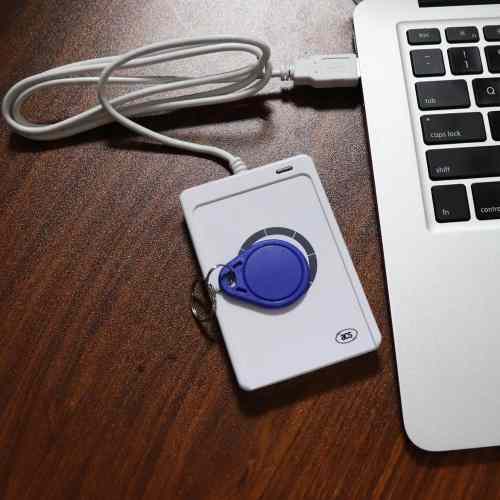
3. Desktop RFID Readers: The size of desktop readers is small and is normally placed alongside the computer. These are very suitable when it comes to reading, coding, and managing items, as well as smaller-scale applications. For instance, the company can have the desktop reader near the computer where the worker will encode the RFID tag before putting it on products.
4. Mobile RFID Readers: There exist RFID readers that connect with cell phones, laptops, and also other mobile computers.
How Do RFID Tags Work?
The RFID label has two crucial components:
1. RFID chip
2. Antenna
The chip carries information. The antenna helps the label exchange information with the reader. RFID labels have various formats, but you will often encounter three types of labels – passive, active, and semi-passive.
| Tag type | How it gets power | Common use |
| Passive RFID | Energy is provided by the reader | Asset tracking and inventory management |
| Active RFID | Self-powered using an internal battery | Long-distance tracking |
| Battery-assisted passive | Uses a battery to augment the tag | Specialized tracking |
The reason why the passive RFID tags are so common is because of the fact that they don’t require any internal source of energy.
Once the reader emits the radio wave, the tag captures the energy of the emitted wave to power itself and respond. It doesn’t mean, however, that all the passive RFID tags have similar performance parameters.
What Information Does an RFID Reader Read?
This depends on the RFID tag. UHF RFID tags have multiple memory spaces.
1. EPC Memory: The EPC includes the identifier that is used to recognise the RFID tag.
2. TID Memory: TID means Tag Identifier. The memory space includes information related to the RFID chip and is provided by the RFID chip manufacturer.
3. User Memory: Certain RFID tags also include user memory space.
A company may use this memory space for:
1. Batch information
2. Product information
3. Maintenance information
4. Configuration information
4. Reserved Memory: Data like passwords for access and kill may be stored in reserved memory. Not necessarily all the memory blocks will be utilised. In RFID applications, the EPC is just used to fetch information from a database.
Also Read: How to Read RFID Tags: A Practical Guide for Beginners
RFID Reader vs. Barcode Scanner
Both RFID and barcodes have identification features, although their working principles differ.
| Feature | RFID | Barcode |
| Technology | Radio waves | Optical scanning |
| Requires line of sight | Often no | Usually yes |
| Multiple items | Can read multiple tags | Usually one at a time |
| Physical contact | No | No |
| Stores electronic data | Yes | No |
| Can be rewritten | Many RFID tags can | No |
| Read range | Depends on the system | Usually short |
This does not imply that RFID is always better than barcodes. The barcode is still relatively inexpensive and suitable for most companies.
It is the RFID technology that becomes more relevant in case you need fast inventory checking, automated scanning or the possibility to identify several products without scanning each separately.
What Do You Need to Start Reading RFID Tags?
But if all you want is to try RFID, then there is no need for you to make any complicated arrangements. What you will need are:
1. RFID Tags: Select appropriate tags according to your application and the surface where these tags should be attached.
2. RFID Reader: Select whether a handheld, fixed, desktop, or mobile reader fits your application needs.
3. RFID Antenna: Select an appropriate antenna to work with your reader and cover the desired range.
4. RFID Software: This is the software where the reader data is processed and displayed.
Frequently Asked Questions
1. What is an RFID reader?
An RFID reader is a device that interacts with RFID tags via radio signals. The reader sends a signal to the RFID tag and receives the tag’s response from an antenna.
2. Can you read an RFID tag without a reader?
It is not possible to read an RFID tag without the help of an RFID reader device. You can use a smartphone to read NFC RFID tags.
3. Can a phone read RFID tags?
You can use a smartphone to read NFC RFID tags. It is impossible to use a standard smartphone to read UHF RFID tags.
4. Do RFID tags need batteries?
Passive RFID tags do not require any batteries. The power is derived from the reader signal. However, active RFID tags have a battery inside them.
Final Thoughts
RFID becomes much easier to understand once you know how the reader, tag, antenna, and software work together. The reader sends a signal, the tag responds, and the reader transfers the information to the software for processing.
From inventory management to asset tracking and retail, RFID can make identification and data collection faster and more convenient. Top Tag RFID provides RFID solutions designed to support different identification, tracking, and inventory management needs. Understanding the basics of RFID technology is the first step toward choosing the right tags, readers, and system for your application.